IPTV Player - Smart Live TV
- 3.9
- Rating
- 10.00M
- Installs
- Free
- Price

 Analysis by App-foxy
I approached IPTV Player - Smart Live TV as a focused viewing tool rather than a replacement for a full streaming service. Its main job is simple: it lets me load my own M3U or M3U8 playlist and use that list to watch available IPTV streams. That narrow purpose is also the app’s biggest strength. Instead of asking me to browse a built-in catalog, it puts the playlist at the center of the experience.
That distinction matters. This is not an app that supplies television channels by itself, and it is not a subscription service. I need a legitimate playlist from a provider or source I trust before the player becomes useful. Once that is understood, the app makes sense as a practical front end for people who already manage IPTV links and want a straightforward way to play them on a mobile device.
Developed by Johran Pastoon App, it belongs to the video players and editors category and is available free of charge. The age rating is Everyone, which fits the basic nature of a playlist player, although the actual material I watch depends entirely on the playlists I choose to load. With a 3.8 average from around 2.3 thousand ratings and more than a million installs, it has clearly attracted a sizeable audience, even though the reception is not uniformly enthusiastic.
You May Also Like

 Blood Strike: 2.5 Anniversary
Blood Strike’s Loadouts Turn Every Drop Into a Tactical Gamble
A close look at Blood Strike’s custom loadouts: how fast access to signature weapons reshapes its battle royale rhythm, rewards preparation, and narrows the gap between fights.

 Pandora - Music & Podcasts
Pandora’s Music Is Easy to Start, but Harder to Recover
Pandora’s strength is its low-effort path from a seed to a station. Its weak spot is how much confidence it asks you to place in connection, setup, and quiet recovery.

 8 Ball Pool
 Is Built on Rivalries, Rematches, and Routine
A close look at the rivalries, rematches, shared routines, and unanswered safety questions that turn a quick pool match into a persistent mobile community.

 Samsung Music
’s Quiet Strength Is Playing What You Already Own
Its reach comes less from spectacle than from dependable access to a personal library. That simplicity is both the app’s strongest retention engine and its ceiling.

 AccuWeather: Weather Radar
AccuWeather Review: A Quick, Clear Forecast for Everyday Decisions
For everyday plans, the best forecast is the one you can understand quickly. AccuWeather makes rain timing, radar, and local conditions easy to act on, with a few trade-offs.

 Hill Climb Racing
Why Hill Climb Racing Still Turns Crashes Into One More Run
A tiny car, a bumpy hill and one more upgrade: Hill Climb Racing keeps resurfacing because its simple chaos makes every near-miss feel personal.
More From Our News Desk



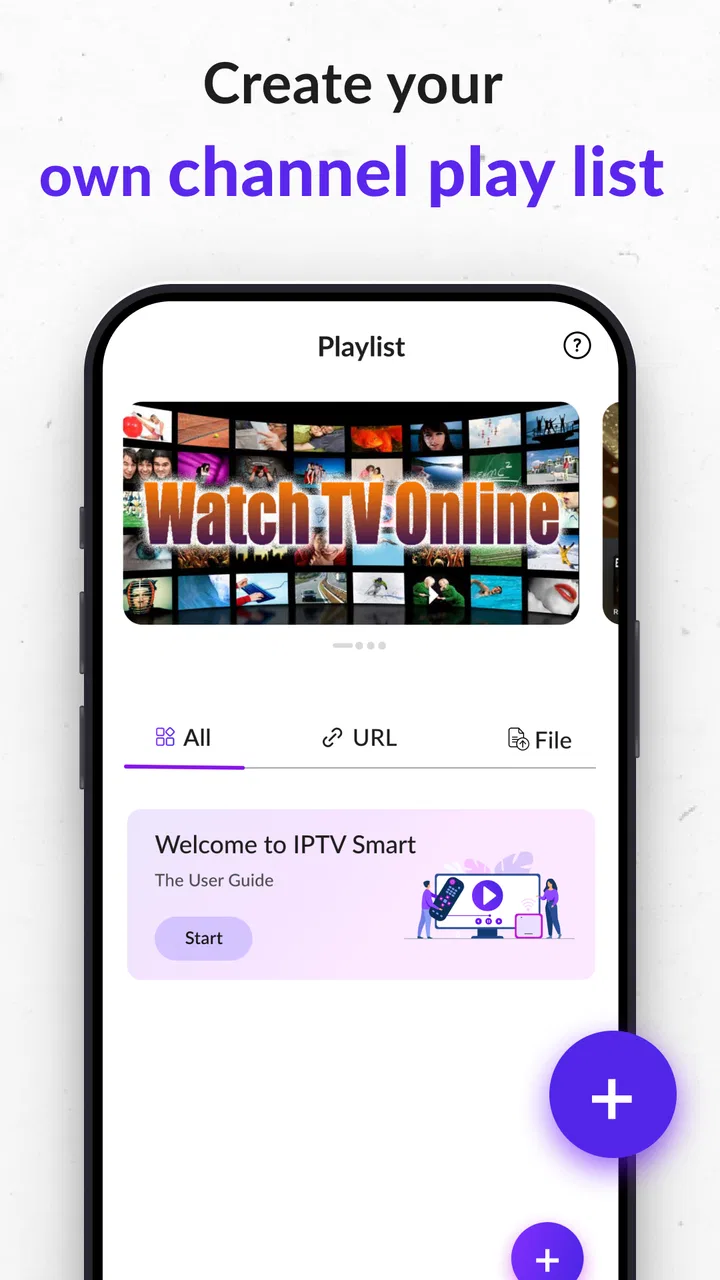
Putting personal M3U and M3U8 playlists at the center
The capability I found most important is the playlist-based approach. M3U and M3U8 files are commonly used to organize IPTV stream addresses, and this app is designed around opening those lists rather than making me search through a separate channel directory. In practical terms, that means the quality of my viewing experience depends on two things: how well the playlist is prepared and how reliably its streams are maintained.
I like this arrangement when I already have a carefully organized list. It avoids the clutter of services that combine recommendations, subscriptions, account screens and unrelated content. I can concentrate on the channels I actually intend to watch. For someone who has received a playlist from a legitimate television provider, or who maintains a personal collection of permitted streams, that directness is more useful than a large number of extra features.
The trade-off is just as important. A player cannot repair an expired stream, a badly formatted file or a channel address that is unavailable. If a channel refuses to play, the problem may be in the source rather than in the application. New IPTV users sometimes expect a player to behave like a television package, but this app requires the playlist side of the arrangement to be handled separately.
That separation also makes the app more flexible for different viewing habits. One person might use a compact list of local channels, while another might keep several lists for news, sports or international programming. I would treat the playlist as the real foundation of the setup and the app as the viewing layer placed on top of it.
What using the playlist feels like
In everyday use, the sensible workflow is to start with a clean M3U or M3U8 source, load it into the player and then choose a stream from the resulting channel collection. The smoother the list, the less time I spend wondering whether an error belongs to the app or the source. Before importing a very large list, I would remove duplicate entries and old channels where possible. That small bit of preparation can make browsing less frustrating.
Another useful habit is keeping separate lists for different purposes instead of placing every available channel into one oversized file. A short list for daily viewing is easier to manage than a sprawling collection filled with inactive entries. This is not a glamorous feature, but it changes the way the app feels: the player becomes more responsive to my routine when the playlist reflects that routine.
I would also keep the original playlist somewhere safe before editing it. If I remove broken entries directly and later discover that a channel has returned, restoring it is much easier when I have an untouched copy. This is especially helpful for people who update their lists manually or move between devices.
Because the app is a player, not a channel provider, I would not judge it solely by the number of streams that work on the first attempt. IPTV sources can change independently of the player. A fair test is to use a current, properly formatted list and see whether the app handles the basic loading and playback process without adding unnecessary obstacles.
A realistic evening use case
Imagine I come home wanting to watch a local news channel from a playlist supplied by my television provider. I do not want to install a separate app for every channel, and I do not need recommendations for films or series. I open my prepared list, select the channel and use the phone as a compact viewing screen while I make dinner. In that situation, the focused design is exactly what I want.
The same approach can work when travelling, provided the playlist is permitted for that use and the connection is suitable. I can carry one organized list instead of remembering several channel-specific apps. The benefit is not that the player creates better content; it is that it gives an existing collection of streams one consistent place to open.
There is a practical limitation in this scenario. A phone connection can be less stable than a home network, and a stream that works well in one location may struggle elsewhere. I would therefore avoid blaming the player immediately if playback pauses while travelling. Checking the source, connection and playlist entry first is a more realistic troubleshooting order.
Small preparation choices that make a difference
My first recommendation is to test a few important channels before relying on the app for a longer viewing session. If the list contains many entries, testing everything is unnecessary. I would begin with the channels I watch most often and confirm that their stream addresses are current. This quickly reveals whether the source is dependable enough for regular use.
Second, I would keep recognizable channel names in the playlist. A list with vague labels makes the player feel harder to navigate, even when playback itself is fine. Clear naming is particularly valuable when several channels have similar titles or when the same broadcaster offers different regional feeds.
Third, I would avoid treating every available stream as equally reliable. Some playlist entries may be experimental, temporary or dependent on a particular network. Marking the dependable entries mentally, or maintaining a smaller everyday list, saves time when I want to start watching quickly.
These are not hidden buttons or secret settings. They are workflow improvements that become apparent because this application leaves playlist management largely in the user’s hands. The more organized the source, the more convincing the player becomes.
Where the focused design helps, and where it gets in the way
The strongest part of IPTV Player - Smart Live TV is its clear purpose. I do not have to learn a complicated media center just to open a playlist. For people who already understand M3U or M3U8 files, that can be a refreshing change from broader streaming applications that bury playback under menus and promotional content.
It is also useful when I want one player for streams that do not belong to a single television brand. A playlist can bring different permitted sources together, and the app gives me a common place to access them. That is more convenient than switching between several unrelated players, especially for someone who watches a mixture of local and international channels.
However, the same simplicity creates limits. A user who wants an integrated content library, polished recommendations, cloud recording, catch-up television or a provider-managed electronic program guide may find this experience too bare. Those functions belong more naturally to a full IPTV service or a feature-rich media center. I would not choose this player expecting it to organize every part of my television life.
Another trade-off is troubleshooting responsibility. When a stream fails, I may need to inspect the playlist, verify the source and decide whether the issue is temporary. A traditional streaming app usually hides that complexity because it controls both the catalog and the playback system. Here, I gain control but also inherit more uncertainty.
The app’s age and version information are worth noting in practical terms: it was released on December 26, 2025, and the current version is 2.1. It supports devices running Android 7.0 or later. That makes it accessible to many older Android phones, although I would still consider the condition of the device and the quality of the playlist before assuming the experience will be smooth.
Since it is free, the financial barrier is low, which makes testing straightforward. Free does not mean every playlist will work, though. The cost question is less about the player and more about whether I already have a lawful, dependable source of streams. I would never treat the app as a way to bypass a provider’s subscription or access channels without permission.
How it compares with familiar alternatives
Compared with a normal subscription television app, this player gives me more control over the source but less of the polished service around it. A provider’s own app may offer a managed channel guide, account support and a more predictable catalog. IPTV Player - Smart Live TV is preferable when I already have a playlist and do not want to be locked into one provider’s interface.
Compared with a general media player, its appeal is specialization. A broad media player may handle local files, network locations and many formats, but it may not feel as direct for an M3U-based channel list. This app makes more sense when live playlist playback is the main task rather than one function among many.
Compared with a full media-center application, it is likely to feel lighter and less demanding to set up, but also less comprehensive. A media center can be the better choice for someone who wants a large library, extensive customization and multiple kinds of media under one roof. I would choose this player when I value a shorter path from playlist to stream.
The right comparison therefore depends on what I already own. If I need content, a provider is the answer. If I need broad media management, a media center may be better. If I have a legitimate M3U or M3U8 list and simply want a dedicated way to play it, this app is the more focused option.
Who will get the most from it
I think the best audience is people who already receive or maintain IPTV playlists and want a simple Android player. It can also suit households that prefer keeping a small, curated channel list instead of installing several separate television applications. The free price makes it easy to try without committing to another subscription.
It is less suitable for someone who expects to open the app and immediately browse a supplied catalog. It is also not my first recommendation for viewers who dislike dealing with broken links, changing sources or playlist organization. Those users will probably feel more comfortable with an official service that manages the channels and technical details for them.
Families should pay attention to the difference between the app’s Everyone rating and the material available through a playlist. The application itself is a general-purpose player, but a playlist can contain many kinds of programming. I would review the source before allowing younger viewers to browse it independently.
For occasional viewing, I would keep the setup deliberately small: one trusted list, a handful of frequently used channels and a backup copy of the original file. For heavier users, separate lists by purpose are more practical than one enormous collection. In both cases, the app rewards preparation rather than trying to hide it.
My recommendation after using its core idea
The real value here is control over your own playlist, not a built-in television catalog. Once I accepted that, the app became easier to evaluate. It is a useful, focused player for legitimate M3U and M3U8 sources, especially when I want a straightforward viewing tool without the extra layers found in broader streaming platforms.
I would recommend IPTV Player - Smart Live TV to a friend who already has a reliable playlist and wants a free Android option that stays close to the basic task of playing it. I would explain the limitations first, particularly that stream reliability and channel availability depend heavily on the source. That honesty is important because the app cannot compensate for an outdated or poorly maintained list.
My final view is positive but specific. This is not an all-purpose entertainment hub, and it should not be chosen as one. It works best as a practical bridge between a user-controlled playlist and a mobile screen. If that is exactly what I need, its focused design is an advantage. If I want a complete television service with managed content and advanced viewing extras, I would choose a different kind of application.
FAQs for IPTV Player - Smart Live TV
01What platforms does IPTV Player - Smart Live TV support?
IPTV Player - Smart Live TV is available for both Android and iOS platforms. Users can download the app from the Google Play Store for Android devices or the Apple App Store for iOS devices. It provides a seamless streaming experience across smartphones and tablets.
02Is there a subscription fee for using IPTV Player - Smart Live TV?
IPTV Player - Smart Live TV offers both free and premium versions. The free version provides basic features, while the premium version unlocks additional functionalities like ad-free streaming and a wider channel selection. Subscription details and pricing can be found on the app’s official download page.
03Can I use IPTV Player - Smart Live TV to stream international channels?
Yes, IPTV Player - Smart Live TV supports streaming of a wide range of international channels. Users can access content from different countries based on their subscription package. It’s ideal for those seeking diverse programming from around the globe.
04How user-friendly is IPTV Player - Smart Live TV?
IPTV Player - Smart Live TV is designed with user-friendliness in mind. The interface is intuitive, making it easy for users to navigate and set up their favorite channels quickly. The app includes a simple guide to help new users get started without hassle.
05Does IPTV Player - Smart Live TV support offline viewing?
Currently, IPTV Player - Smart Live TV focuses on live streaming and does not support offline viewing. Users will need a stable internet connection to stream content. This feature might be included in future updates, depending on user demand and feedback.
Pros
- User-friendly interface for easy navigation.
- Supports a wide range of video formats.
- Customizable channel lists and categories.
- Offers a stable streaming experience.
- Compatible with Chromecast for big screen viewing.
Cons
- Requires a strong internet connection.
- Limited free features without subscription.
- No built-in parental controls.
- Ads can be intrusive in the free version.
- Initial setup can be confusing for beginners.

IPTV Player - Smart Live TV
Gallery